AI-Powered Summary
- ProdCast is a regression suite that replays real production traffic against new code to ensure changes do not unintentionally alter existing flows.
- It was developed to address subtle bugs introduced by AI coding agents, which often pass reviews but quietly break untested flows.
- The system uses a seven-phase pipeline to capture production behavior, replay it locally, compare results, and explain any divergences.
- ProdCast ensures that production data remains secure by using masked or synthetic values during testing.
- Teams adopting ProdCast configure scenario payloads, log filtering rules, and endpoints to tailor it to their services.
- By automating context rebuilding and providing precise reports, ProdCast significantly reduces debugging time and improves code review processes.
Production tells the truth.
Code states the intent.
Record-replay bridges proves them.
AI coding agents have made our team meaningfully faster. They have also introduced a category of bugs we didn’t have at the same rate before: changes that look correct, pass review, and quietly break a flow nobody re-tested because nobody knew it was at risk — context the agent didn’t have, an assumption that didn’t hold, a fix that solved the prompt instead of the bug. We built ProdCast as the safety net underneath all of it: a regression suite built on real production traffic, replayed against new code before it ships, that proves the changes only do what they are supposed to do.
Why we built this
Our team adopted AI coding agents the way most teams have: cautiously at first, then quickly, once it became clear how much faster routine work could ship. The productivity gains were real. So were the edge cases.
The pattern wasn’t agents producing obviously broken code — review catches that. It was subtler: a routing rule fixed for the bug it was asked about, unintentionally altering three other flows that depended on the same rule. A refactor passing every test it was asked to write, because the tests only covered the path it changed. A fix that worked perfectly in isolation and silently regressed a downstream service nobody had thought to check. The common thread is that the agent only knew what it was shown — when the context window missed something, when an assumption didn’t hold, when the prompt was narrow, the fix was narrow too, and the existing flows around it absorbed the damage quietly.
Our team’s response wasn’t to slow the agents down. It was to build a regression layer that didn’t rely on someone remembering to test every flow the agent might have touched. ProdCast is that layer. It takes real production traffic — the actual requests, with the actual state, against the actual downstream contracts — and replays it against the new code before deploy. If a flow the agent shouldn’t have changed has changed, the replay surfaces it.
Tests verify what you changed. ProdCast verifies what you didn’t.
In short: ProdCast records what production actually does, replays the same request against a proposed code change on a local cluster, and tells you whether the behavior is identical or has drifted. Teams use it to ship faster — every PR comes with evidence that nothing it shouldn’t have changed has changed.
So what does “replays real production traffic” actually mean in practice? The harness is a seven-phase pipeline — capture, rebuild state, replay, compare, explain — with two optional setup phases and the rest required. Walked through next.
The pipeline
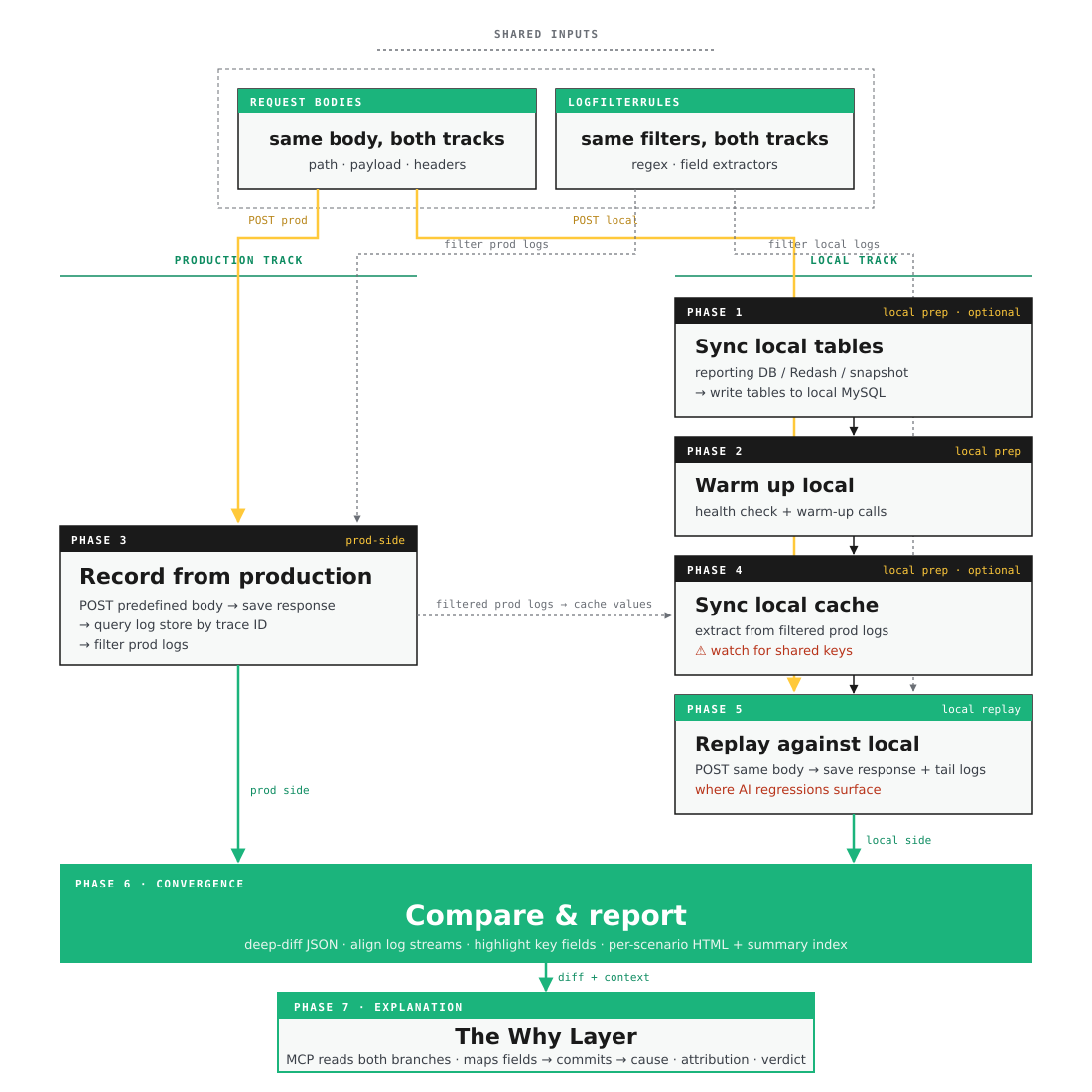
Seven phases across two tracks. The production track and local track draw on two shared inputs — Request Bodies and LogFilterRules — converge at the compare step, and feed into the MCP-backed Why Layer for diagnosis.
The diagram above shows seven phases organized into two parallel tracks, a convergence, and an explanation. What it doesn’t show is what holds them together: two shared pieces — Request Bodies and LogFilterRules — that guarantee both tracks are answering the same question and reading the answer the same way.
Production track
Record from production
Goal. Capture the canonical response and the telemetry that surrounded it.
How. POST the predefined request body to the production endpoint, save the response, then query the log store for every line tagged with the returned trace ID within a small window of the recorded timestamp.
Note. This is where the correlation key is born. Without a clean trace ID on the response, none of the later phases can line up the two sides of the diff.
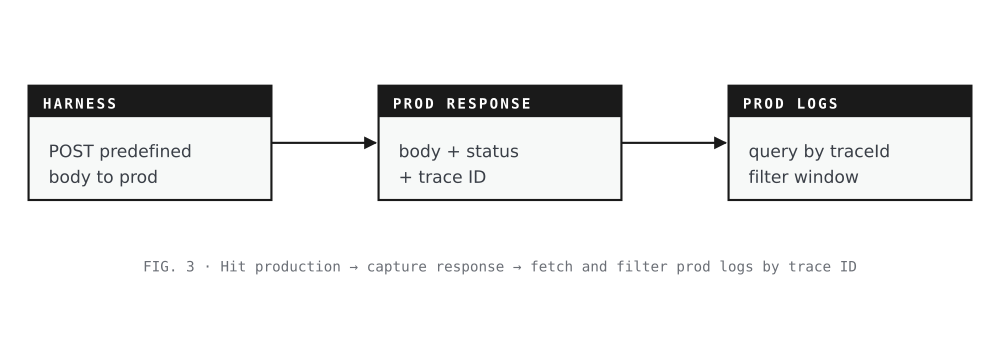
Hit production · capture response · fetch and filter prod logs by trace ID
Local track
Sync local tables from production
Goal. Make the local cluster’s database look enough like production’s for the replay to be meaningful.
How. Pull from a reporting DB, a saved Redash query, or a snapshot file — whichever the team has standardized on — and write the relevant tables into local MySQL.
Skip when. The replay path doesn’t read relational state, or the local DB was synced earlier the same day.
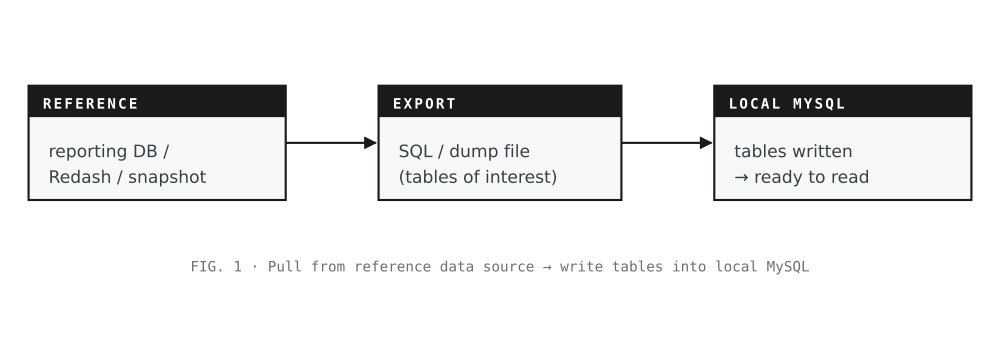
Pull from reference data source · write tables into local MySQL
Warm up the local environment
Goal. Get the local service into a state where the next request won’t fail for cold-start reasons unrelated to the actual diff.
How. Start the service, hit health endpoints, run any team-standard warm-up calls that prime in-process state, config caches, or JIT-compiled paths.
Note. Skipping this is the most common cause of a diff that says “local returned 500” — and 500s break the comparison before it can tell you anything useful.
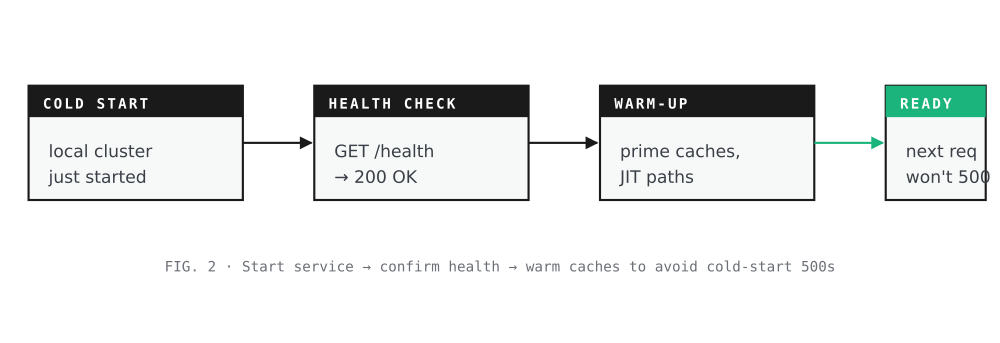
Start service · confirm health · warm caches to avoid cold-start 500s
Sync the local cache (optional)
Goal. Pre-populate the local Redis with the same shape of state the production cache had when the request was recorded.
How. Use the filtered prod logs as the source: extract the cache values the service read during the production call, then write them into local Redis under the keys the service expects.
Skip when. The replay path doesn’t read from cache, or the service under test doesn’t use Redis at all.
Worth noting. Cache keys for the same entity (a merchant, a tenant, a user) tend to collide across scenarios — one scenario’s write overwrites another’s. Anyone adopting the harness has to decide upfront how scenarios will be isolated from each other in shared cache space.
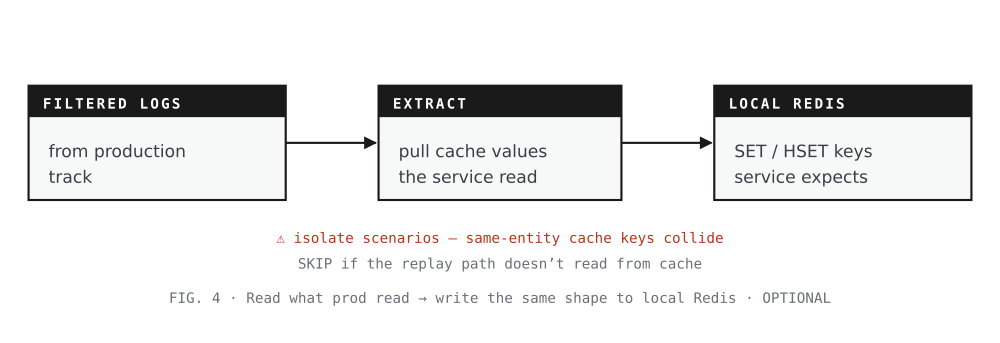
Read what prod read · write the same shape to local Redis · OPTIONAL
Replay against local
Goal. Run the same predefined request against the local cluster and capture what it returns.
How. POST the same request body that was sent to production, save the response, tail the service’s console logs into a file, then filter those logs the same way the prod logs were filtered.
Worth noting. This is the phase where AI-introduced regressions surface. The production track captured what the system did on the unchanged code. This replay captures what the system does now, with the agent’s changes in place. The comparison step is the only place that difference becomes legible.
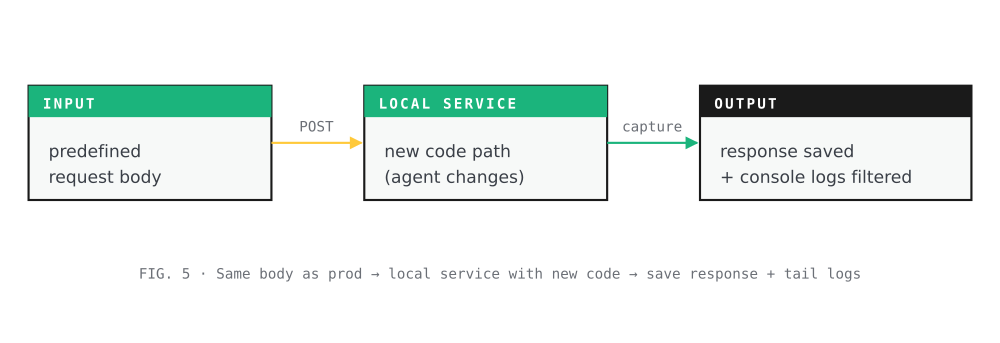
Same body as prod · local service with new code · save response + tail logs
The convergence
Compare and report
Goal. Show, with evidence, where production and local diverged.
How. Deep-diff the two response JSONs, align the two filtered log streams, highlight the fields the team cares about (gateway ID, routing region, pricing tier — whatever the service’s “output” actually is), and publish an HTML page per scenario plus a summary index.
What you read first. The verdict (IDENTICAL or DIFFERENT) and the highlighted field diff. Logs are for context. For divergences, the next phase explains why.
The explanation
The Why Layer
Goal. Take the diff and explain it. Which code changed, why the change shifted the response, and whether the divergence is a regression or expected.
How. A local MCP server reads both branches involved — the production deploy branch and the branch being tested locally — alongside the diff verdict, the diverging fields, and the filtered log streams from both sides. It maps each diverging field back to the code that produces it, identifies the commits between the two branches that touch that code, and reasons about what kind of divergence this is using project context: a routing rule that was added on local but not yet merged, a config value that’s only set in production, a cached value that’s stale on local, a downstream contract that one side honors and the other doesn’t. The output isn’t just “X differs from Y” — it’s a short paragraph naming the suspected cause and the file, commit, or config to look at.
What the engineer reads. Three things, in order. First, the cause classification — code change, missing config, stale cache, business-logic shift, upstream contract drift. Second, the attribution — the specific commit, file, and line that introduced the divergence, with a one-sentence summary of what the commit did. Third, the verdict from project context — whether the local branch’s behavior or the prod branch’s behavior is the one the team intends to keep, based on the PR description, related issue, or any project-specific rules the MCP has access to.
Worth noting. The MCP isn’t authoritative. It surfaces the most likely explanation and the evidence supporting it; the engineer still decides what to do with that. In practice, the most useful output isn’t the cause classification — it’s the “look here first” pointer that turns a 30-minute investigation into a 30-second one.
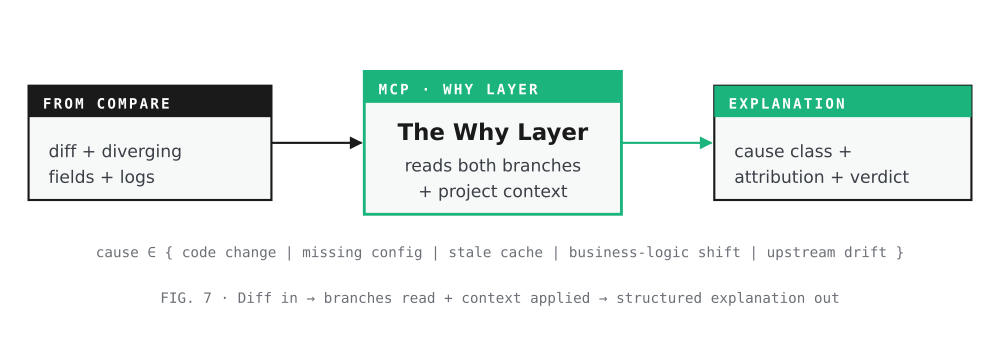
Diff in · branches read + context applied · structured explanation out
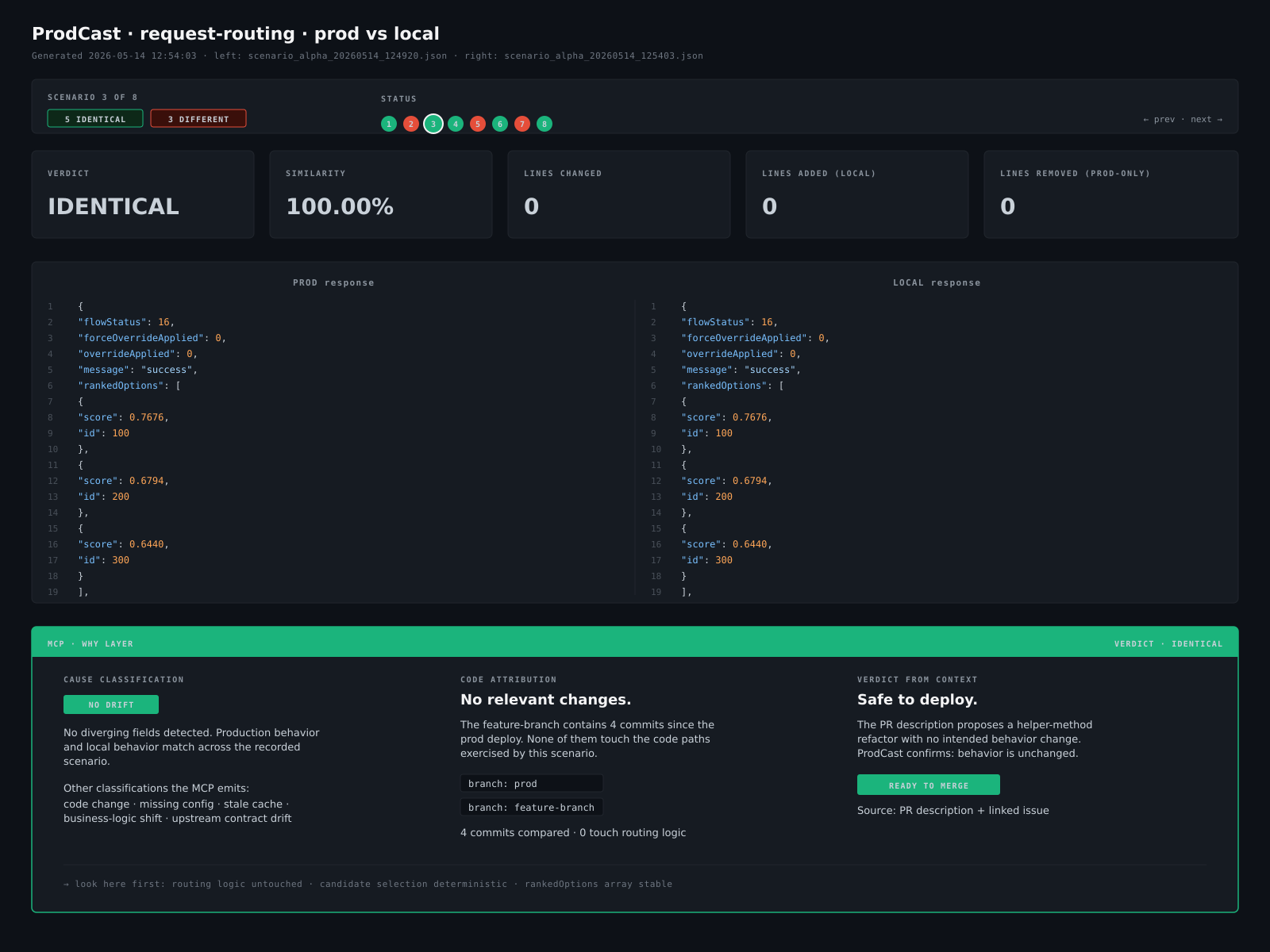
The Why Layer for one scenario — diff above, MCP cause classification + code attribution + verdict from PR context below.
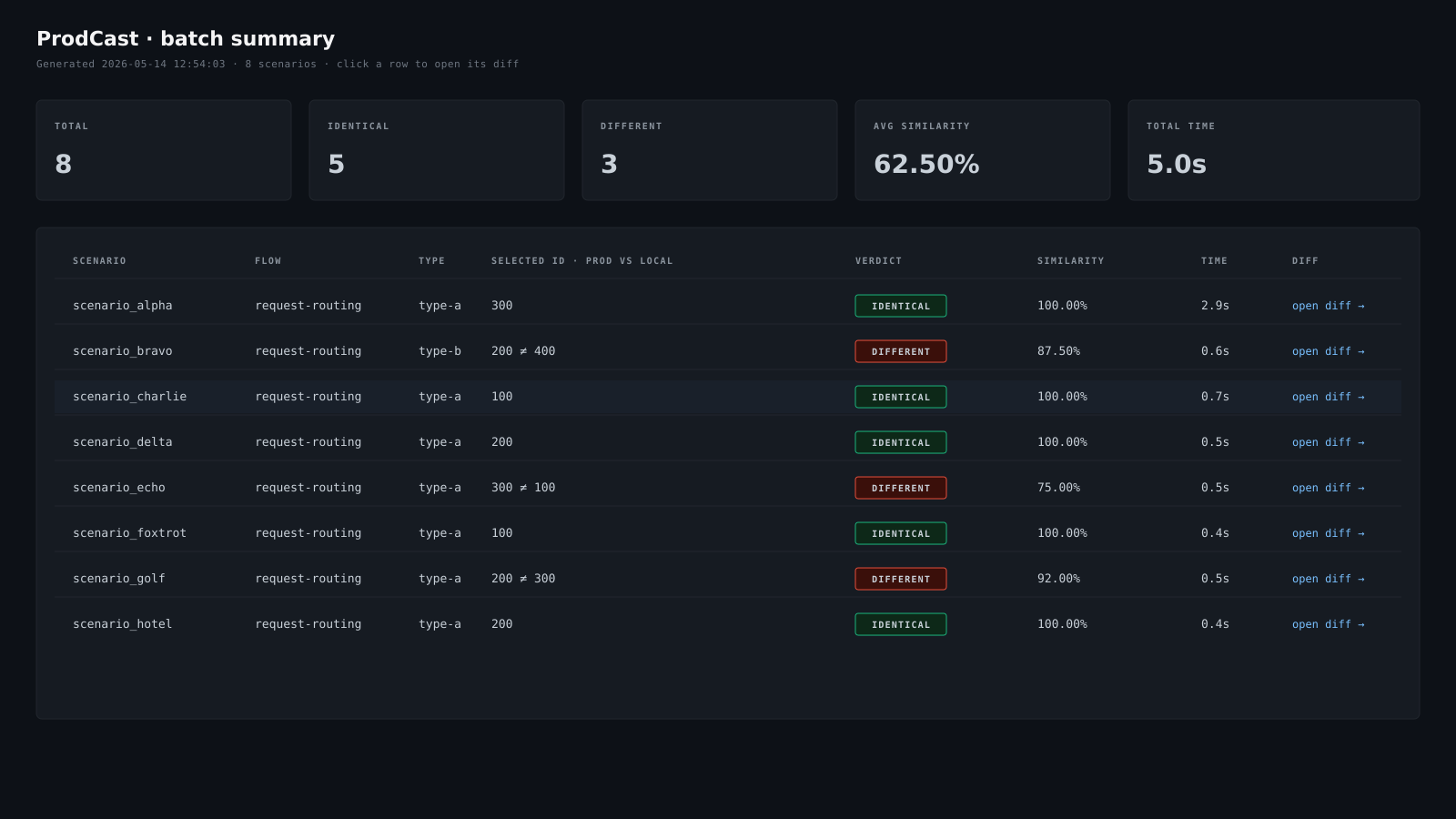
The batch summary after a run — one row per scenario, with verdict, similarity, and the selected ID compared.
A note on customer data
ProdCast is built around a constraint: real customer data never leaves production. Every step that touches prod — table sync, response capture, cache seeding, the comparison report — works with masked or synthetic values. If the harness ever needed real PII to do its job, the test wouldn’t be testing behavior anymore.
Adopting it: what each team configures
Most of what you just walked through is generic. The OpenSearch queries, the cache-seeding logic, the diff renderer, the report HTML — none of it changes per service. A team picking ProdCast up for a new service only needs to configure three things:
- Request Bodies. A set of scenario payloads covering the edge cases the team cares about — happy paths, known-tricky requests, the merchant that exposed a bug last quarter. Each scenario is a single JSON file; the harness picks them up automatically.
- LogFilterRules. The regex and field-extraction rules that decide which log lines matter for this service. Different services log different things, so this is where service-specific knowledge lives. Once written, the same rules apply to both prod and local sides.
- Endpoints. The production URL the harness hits to record, and the local URL it hits to replay, plus any auth the service requires.
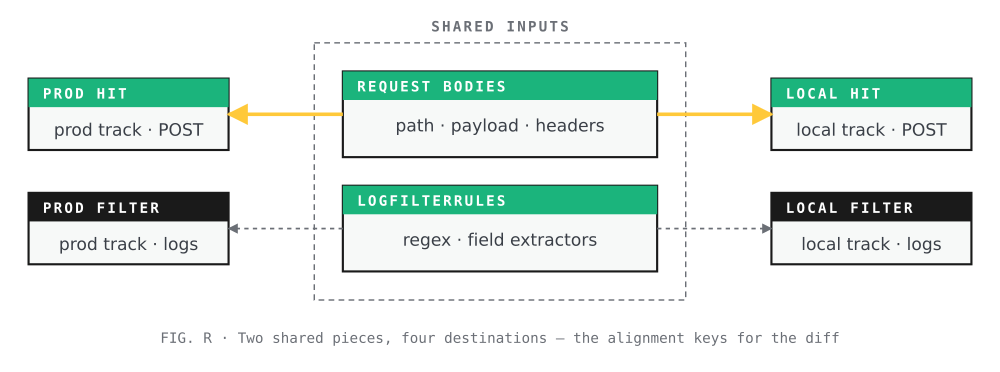
Two shared pieces, four destinations — the alignment keys for the diff.
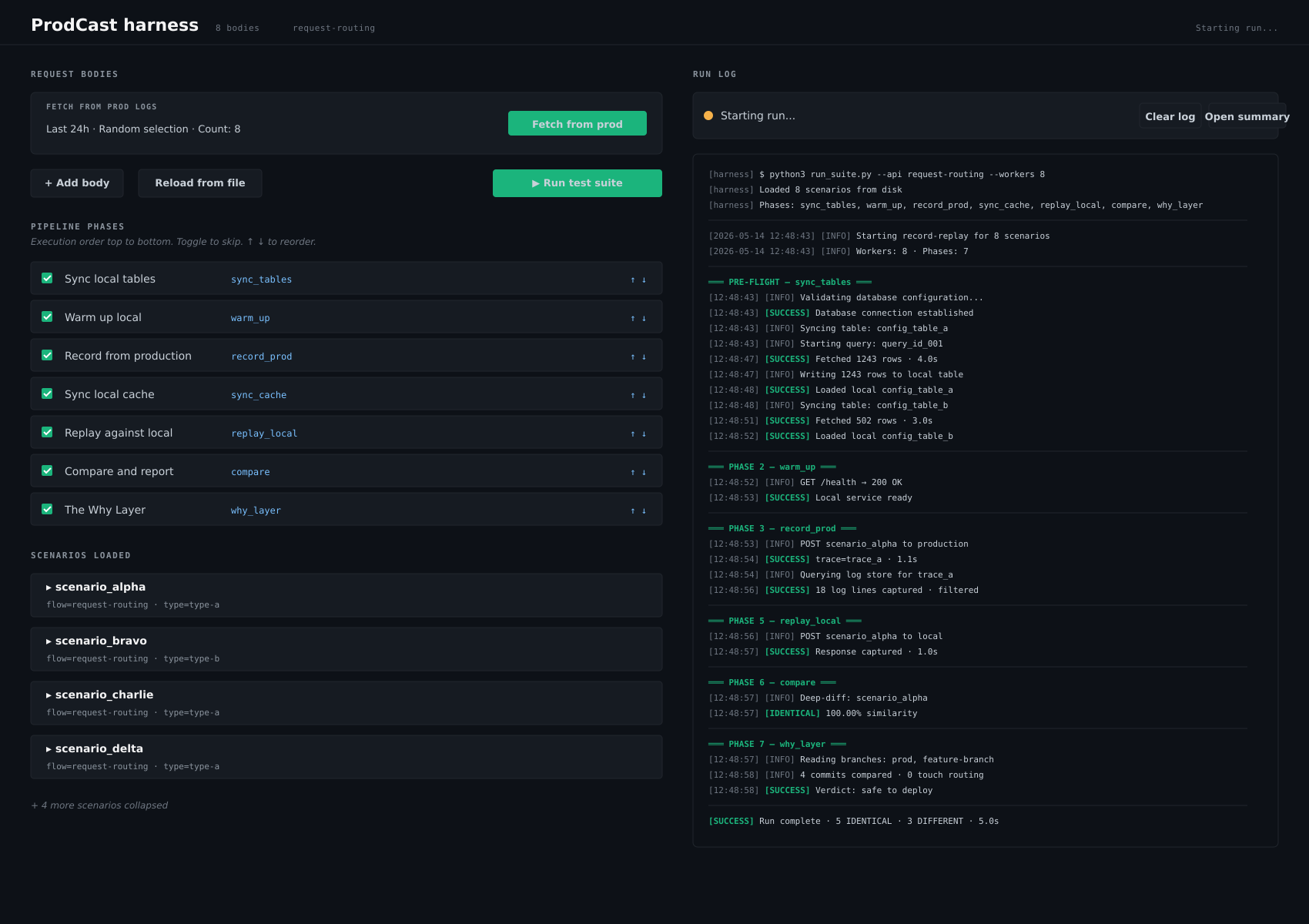
The harness in action — scenarios on the left, pipeline phases as toggles, and the run log streaming on the right.
What this changes in practice
Before ProdCast, a “production behaves differently than my local” investigation was a half-day exercise of curl, console.log, and educated guessing. Most of that time was spent rebuilding context — what was the request, what state did prod have, what does my local actually see — before any real debugging could start.
After ProdCast, that work happens automatically. The engineer runs one command, gets a report in a few minutes, and either confirms parity (move on with confidence) or gets a precise diff with a starting point for the actual bug.
The shifts we noticed:
- Bugs get reported with reports. Instead of “this looks wrong on my branch,” PRs come with a ProdCast report attached, showing exactly which scenarios pass and which diverge.
- Code review changed shape. A reviewer can ask “did you run ProdCast on the affected endpoints?” and that’s a concrete, verifiable question instead of a vibe.
- The question “what else might this have broken?” got an answer. Before, it was the kind of question PRs lingered on indefinitely because the team had no concrete way to check. Now ProdCast is the check. PRs move.
Closing
ProdCast isn’t a clever idea. It’s an unglamorous one: capture real traffic, save it, replay it, diff it. The interesting work is in the seams — getting log ingestion timing right, avoiding shared-key collisions in Redis, parsing logs that change shape every quarter, making the report readable enough that engineers actually open it.
Each of those seams was something our team learned the hard way and encoded into the pipeline so the next engineer doesn’t have to. That’s mostly what mature infrastructure tooling is: a record of every avoidable mistake the team has already made once.
The mistakes we’re avoiding now belong to a new era. We didn’t slow the agents down to catch them. We added a layer underneath them — one that uses the only source of truth that doesn’t lie about production behavior: production behavior itself.
The bug you’re chasing today is probably one ProdCast report away from being obvious.