

AI-Powered Summary
- A payment gateway connects buyers, merchants, and their respective banks to facilitate online transactions.
- The integration process involves API calls, starting with a POST request from the merchant's website containing mandatory parameters like key, transaction ID, amount, and hash.
- Customers are redirected to the payment gateway's page to select a payment method and complete authentication with their bank.
- The payment gateway creates a unique transaction entry, processes the bank's response, and sends the final transaction status back to the merchant via a POST response.
- PayU offers shopping cart integration kits and platform-based integration kits to simplify the payment gateway integration process.
- PayU supports integration in environments like PHP, JSP, .NET, and ROR, providing a quick and easy setup for developers.
A payment gateway binds together all the stakeholders involved in a transaction with a buyer, merchant, buyer’s bank and seller’s bank. This is why it takes a long time for an individual to become fully comfortable in implementing a gateway in a website. A payment gateway integration is crucial for highly successful online transactions. So, we explain here the API calls that usually happen when making a transaction with a payment gateway.
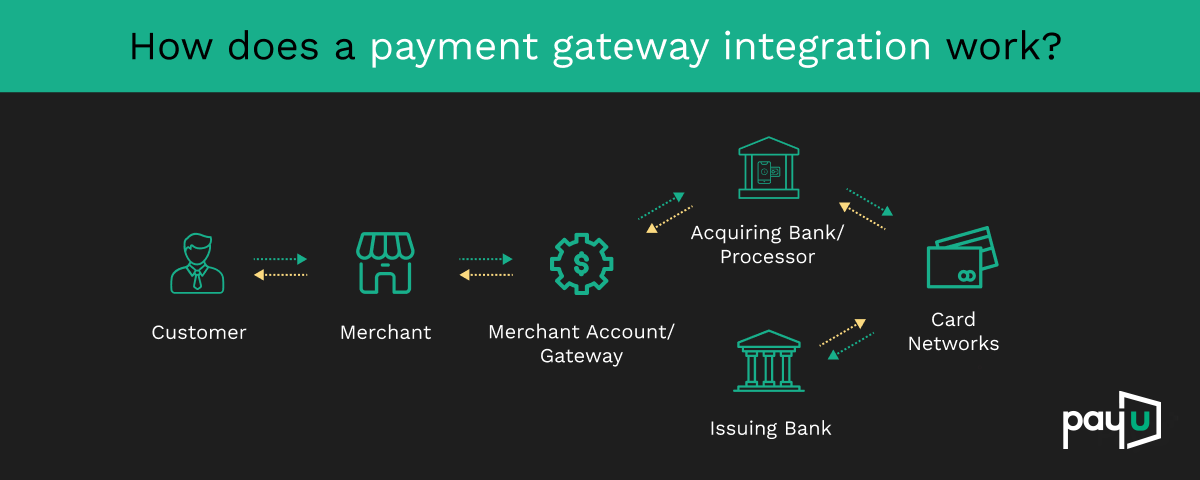
The image above shows the main integration steps.
API Integration Steps
Merchant website
To initiate a transaction, the merchant generates a POST REQUEST (which is a particular mode of interaction on the internet). The request must include mandatory and optional parameters. The mandatory fields include a key (provided by gateway), txn ID (order reference number generated at merchant’s end), amount product info, first name, email, phone, service_provider, and hash (checksum). Merchant also calculates a hash and sends it to the payment gateway.
PayU Payment Gateway’s Website
When the POST request reaches PayU, the customer would be re-directed to payment gateway’s (PayU’s) payment page. The customer now selects the particular payment option on payment gateway’s (PayU’s) page (Credit Card/Debit Card/Net Banking etc) and clicks on ‘Make Payment’. Now, payment gateway re-directs the customer to the chosen bank. The customer goes through the necessary authorization/authentication process at bank’s login page, and the bank gives the success/failure response back to the payment gateway.
- When the transaction POST request hits the payment gateway server, a new transaction entry is created in the database. To identify each new transaction in the gateway database, a unique identifier is created every time at gateway’s end.
- Our payment gateway marks the transaction status on the basis of response received from Bank.
- A final transaction response is sent to the merchant through a POST RESPONSE. In this response, the merchant would receive the final status of the transaction. Merchant will also receive the hash parameter here. This is done to strictly avoid any tampering attempt by the user.
Read more – How to Integrate a Payment Gateway API into Websites
How Different Kits Ease The Payment Gateway Integration Process
Different kits provide different APIs to automate a lot of tasks. PayU provides developers with two kinds of kits for easy integration– shopping cart integration kits and platform-based integration kits.
Shopping Cart Integration Kits
Shopping cart kits follow an easy payment gateway integration procedure with the help of codes and APIs. Currently, the PayU provides more than 30 shopping cart integration kits. Some of which are:
- Opencart
- Interspire
- Joomla VirtueMart
- Magento
- Prestashop
- Zencart
- CS-Cart
- OScommerce
- WordPress eCommerce
- WordPress wooCommerce
- Drupal Ubercart
- WHMCS
Platform-Based Integration Kits
PayU currently provides integration kits in 4 different environments
- PHP
- JSP
- .NET
- ROR
PayU has the easiest and quick payment gateway integration process. Know more about the PayU Payment Gateways Integration with your website now!
Ask us more about PayU website integration process at merchantcare@payu.in



Leave a Comment