AI-Powered Summary
- Offline UPI payments can be made without internet by dialing *99#, which works on any mobile phone using USSD technology.
- The service is available in 13 regional languages, making it accessible to a diverse population across India.
- Transactions are secured with a UPI PIN, ensuring safety even without internet connectivity.
- Users can perform multiple services such as sending money, checking balances, viewing mini statements, and changing UPI PINs.
- The transaction limit for offline UPI payments is ₹5,000, with a charge of ₹0.50 per session.
- Offline UPI payments are inclusive, enabling digital transactions in rural and low-connectivity areas.
In this guide, you’ll learn how to make UPI payment without internet, how the offline UPI setup works, what services are available, the benefits of UPI offline payment, and how to use it safely.
Table of Contents
What is an offline UPI payment number?
By dialing the offline UPI payment number (*99#) on your phone, you can access UPI services without an internet connection. This service is available all over India. Additionally, when you perform an offline UPI transaction, you can select the language that is most comfortable for you to use, as the service is available in 13 different languages, including Hindi and English.
The NPCI (National Payments Corporation of India) launched the offline UPI service and introduced the UPI payment number *99# to facilitate UPI transactions across various banks in India. When you dial the number associated with your registered mobile number, you can easily complete transactions with the help of an interactive menu available on your mobile screen.
Currently, the offline UPI payment limit is set at Rs. 5,000. In addition, you will be charged. Rs. 0.50 per transaction to use the offline UPI service.
What Are the Benefits of Offline UPI Payments?
Offline UPI payment isn’t just a workaround for bad internet days. It’s a thoughtfully built system with real advantages, especially for a country as diverse as India. Here are the key benefits:
1. Works on Any Mobile Phone Without Internet
The *99# offline UPI service doesn’t need a smartphone, a data connection, or any app. It runs entirely over the cellular voice network using USSD technology. This means it works on even the most basic feature phone, as long as it has a SIM card with an active cellular signal.
For India’s rural population, daily wage workers, senior citizens, and anyone in an area with poor data connectivity, this makes offline UPI payment genuinely inclusive. You don’t need 4G, Wi-Fi, or even a touchscreen. Just a phone signal is enough to complete a UPI payment without internet.
2. Available in 13 Regional Languages
Language should never be a barrier to digital payments and offline UPI takes that seriously. When you dial *99#, you can choose to use the service in 13 languages: Hindi, English, Tamil, Telugu, Kannada, Marathi, Bengali, Gujarati, Punjabi, Odia, Assamese, Malayalam, and Urdu.
This level of language inclusivity is a major differentiator. A vegetable vendor in Tamil Nadu can complete a UPI transaction in Tamil. A farmer in Maharashtra can check his account balance in Marathi. The offline UPI payment number *99# is designed to work for everyone, not just English-speaking smartphone users.
3. Secure Transactions with UPI PIN
Just because there’s no internet doesn’t mean there’s no security. Every offline UPI payment requires your UPI PIN to authorize the transaction, so even if someone has your phone in hand, they can’t complete a payment without your PIN.
NPCI’s USSD infrastructure uses encryption protocols to secure the data exchange between your phone and the banking system. The entire flow is built on the same secure UPI framework used for online transactions.
A word of caution: never share your UPI PIN with anyone — not even someone claiming to be from your bank or a payment helpline. Legitimate bank representatives will never ask for your PIN. This applies whether you’re using online or offline UPI services.
4. Multiple Services Beyond Just Payments
Offline UPI payment via *99# isn’t limited to sending money. The full menu covers a wide range of UPI services:
• Send money — Transfer funds to any UPI ID, mobile number, or bank account
• Request money — Ask someone to send you a specific amount
• Check account balance — View your current bank balance instantly
• Change UPI PIN — Reset or change your PIN without internet
• Mini statement — View your last 5 transactions
• Check UPI transaction status — Verify whether a past transaction went through
• UPI transaction history — Review recent activity on your account
This full suite of services makes *99# much more than just an emergency payment tool. It’s a complete offline UPI gateway to your bank account, available anytime from any phone.
How to Set Up Offline UPI Payments?
Now that you know the offline UPI payment number and the transaction limit, it would be helpful to understand how to use the service and make offline UPI payments. Before you start using the offline UPI transaction service, you must set up that option on your phone. To do this, follow the steps below.
1. Open the dialer on your phone and dial the UPI offline code number – *99# and press the call button.
2. You will then be asked to select your preferred language. Choose the language as you want from the 13 options available.
3. Next, you will be asked to enter the IFSC (Indian Financial System Code) of your bank in the text field
4. If you are using a smartphone, you will have the option to select all the bank accounts registered to your phone number. You must choose the preferred option and link the desired bank account number to set up the offline UPI payment process.
5. You will then be asked to enter the last six digits of the debit card and its expiry date to complete the verification process.
6. After you have entered all the necessary details, your offline UPI payment will be activated, and you can start making offline UPI transactions immediately.
How to do offline UPI payments?
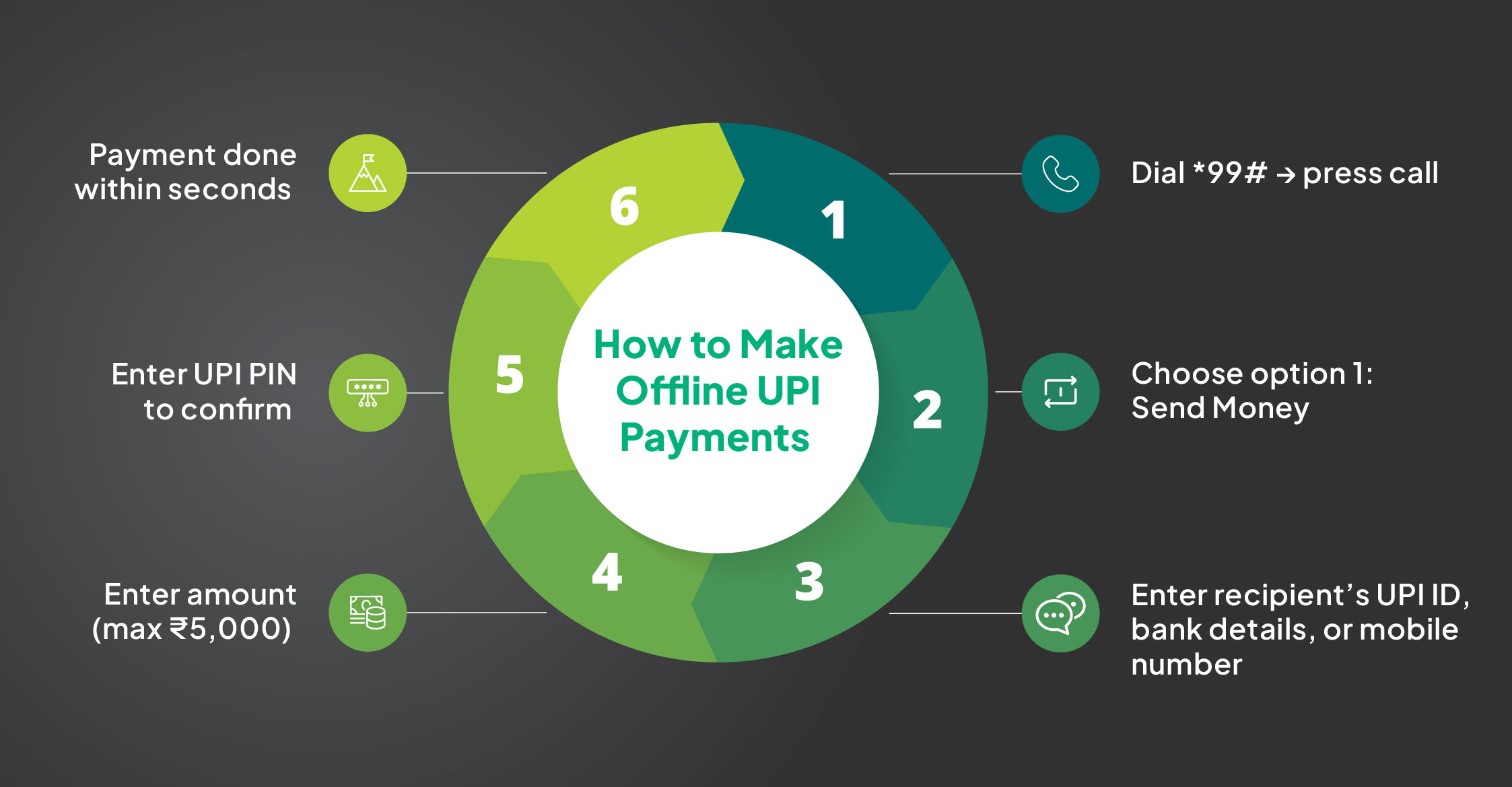
Once you finish setting up the offline UPI payment feature on your phone, you must follow the steps below to make payments.
Step 1: Open the dialer on your phone, and under the UPI offline payment code – *99#, press the call button
Step 2: You would see different options available on your screen, select option 1. It stands for ‘send money.’
Step 3: Next, enter the UPI ID you want to use for making the payment. You can also enter your bank account details or the registered mobile number (assuming the number and the bank account are linked).
Step 4: Now, please enter the desired amount you wish to pay. Remember, the maximum limit is Rs. 5,000, and please confirm this when prompted.
Step 5: The UPI system will prompt you to enter your UPI PIN; please enter it to validate the transaction. Once you enter the PIN, the transaction is processed within seconds, and you can finish making the payment.
If you are not satisfied with using the offline UPI payment service, or you simply no longer wish to use it, you can easily disable the service by dialling the *99# code from your registered mobile number and following the instructions accordingly.
How to Check Balance and Mini Statement Offline?
You can easily check your bank balance and view recent transactions using UPI payment services through the USSD system.
How to Check Bank Balance?
1. Dial *99# and press Call.
2. Select your preferred language.
3. From the main menu, select Option 5 — ‘Check Balance’.
4. Enter your UPI PIN when prompted.
5. Your current bank account balance will be displayed on screen.
How to View Mini Statement? (Last 5 Transactions)
1. Dial *99# and press Call.
2. Select your preferred language.
3. From the main menu, select Option 6 ‘Pending Collect’ or navigate to the mini statement option (menu numbering may vary slightly by bank).
4. Enter your UPI PIN.
5. Your last 5 transactions, including date, amount, and status, will be displayed as your offline UPI transaction history.
Note:
The mini statement shows the 5 most recent transactions on your linked bank account. This is the quickest way to check your UPI transaction history when you’re offline.
How to Change UPI PIN Offline?
If you have forgotten your PIN or simply want to update it, you can learn how to change UPI PIN through the offline system.
Step 1. Dial *99# from your registered mobile number and press Call.
Step 2. Choose your preferred language from the menu.
Step 3. Select Option 7 — ‘UPI PIN’ (or ‘Change UPI PIN’ depending on your bank’s
menu layout).
Step 4. You’ll be asked to enter your debit card details for identity verification —
specifically, the last 6 digits of your debit card number and the card’s expiry
date. Have your debit card ready before starting this process.
Step 5. Enter your new UPI PIN (typically 4 or 6 digits, depending on your bank).
Step 6. Confirm the new PIN when prompted.
Step 7. You’ll receive an on-screen confirmation that your UPI PIN has been
successfully changed.
Tips for Using Offline UPI Payments Safely
Offline UPI payment is secure by design, but a few smart habits go a long way in keeping your money safe. Here are the most important ones:
• Keep your UPI PIN strictly confidential: Never share your PIN with anyone, family, friends, or anyone claiming to be from your bank or NPCI. No legitimate service will ever ask for it.
• Always verify recipient details before confirming: When sending money offline, double-check the recipient’s name that appears on screen before entering your PIN. Entering a wrong UPI ID or phone number can result in money going to the wrong person.
• Ensure your phone is charged before you start: A USSD session will terminate if your phone dies mid-transaction. If that happens before confirmation, check your UPI transaction status before retrying to avoid duplicate payments.
• Be aware of UPI charges on offline transactions: There are charges on UPI payment made via *99# — ₹0.50 per session is deducted by your telecom operator. While small, it’s worth knowing, especially if you use the service frequently.
• Use only in trusted locations: Avoid entering your UPI PIN in crowded public places where someone could observe your screen. Use offline UPI in a private or semi-private setting whenever possible.
• Don’t respond to unsolicited *99# requests: If someone sends you a USSD-based collect or payment request you didn’t initiate, don’t accept it. Confirm any request directly with the person before approving.
Offline UPI Payment vs Online UPI Payment
Both methods let you complete UPI transactions, but they work very differently. Here’s a side-by-side comparison to help you understand when to use which:
| Feature | Offline UPI Payment (*99#) | Online UPI Payment (App-based) |
| Internet required | No — works on cellular network only | Yes — needs mobile data or Wi-Fi |
| Device compatibility | Works on any phone, including basic feature phones | Requires a smartphone with a UPI payment app |
| Transaction limit | ₹5,000 per transaction | Up to ₹1 lakh per transaction (varies by bank) |
| Speed | Slightly slower (USSD-based menu navigation) | Fast — typically under 3 seconds |
| Services available | Send, receive, balance check, mini statement, change UPI PIN | Full UPI features: payments, requests, autopay, history, and more |
| Charges on UPI payment | ₹0.50 per USSD session (telecom operator charge) | Free for most transactions |
| UPI transaction history | Last 5 transactions via mini statement | Full transaction history in app |
| Language support | 13 regional languages | Depends on the UPI payment app |
| UPI gateway access | Via NPCI’s USSD infrastructure | Via UPI payment gateway connected to bank servers |
Conclusion
UPI has revolutionized how people send and receive money in India. But even when the internet fails, you can still complete a UPI payment using the offline system.
By dialing the offline UPI payment number *99#, you can perform essential banking services such as sending money, checking balances, viewing UPI transaction history, or learning how to change UPI PIN.
The biggest advantage of offline UPI payment is that it works on basic mobile phones and only requires a cellular network. This makes digital payments accessible even in rural areas or low-connectivity zones.
Whether you’re trying to complete a UPI payment without internet while travelling or simply need a backup payment option, the UPI offline payment system ensures you can continue making transactions anytime, anywhere.
FAQs
What is offline UPI payment?
Offline UPI payment allows you to make a UPI payment without internet using the USSD code *99#.
What is the USSD code for offline UPI payment?
The official offline UPI payment number is *99#, which lets you access offline banking services.
What is the transaction limit for offline UPI payments?
The typical limit for offline UPI payment transactions is around ₹5,000 per transaction.
Which banks support offline UPI payments via *99#?
Many banks including SBI, HDFC Bank, ICICI Bank, Axis Bank, and over 80+ banks support offline UPI payment services.
Is offline UPI payment secure?
Yes. Every UPI payment requires authentication through your UPI PIN, ensuring safe transactions.
Which services are accessible via *99# offline UPI?
You can send money, request money, check balance, view UPI transaction history, and perform UPI money transfer.
How to check offline UPI transaction history?
Dial *99#, navigate to the transaction or mini statement section, and view your recent UPI transaction history.